How Coffee Shops Can Use Digital Menus and QR Ordering
Coffee shop menus are deceptively complicated.
There's the drink itself, then the size, the milk, the extra shot, the flavor syrup, hot or iced, and the pastry that goes with it. During the morning rush, customers are trying to make all those choices while a line builds behind them.
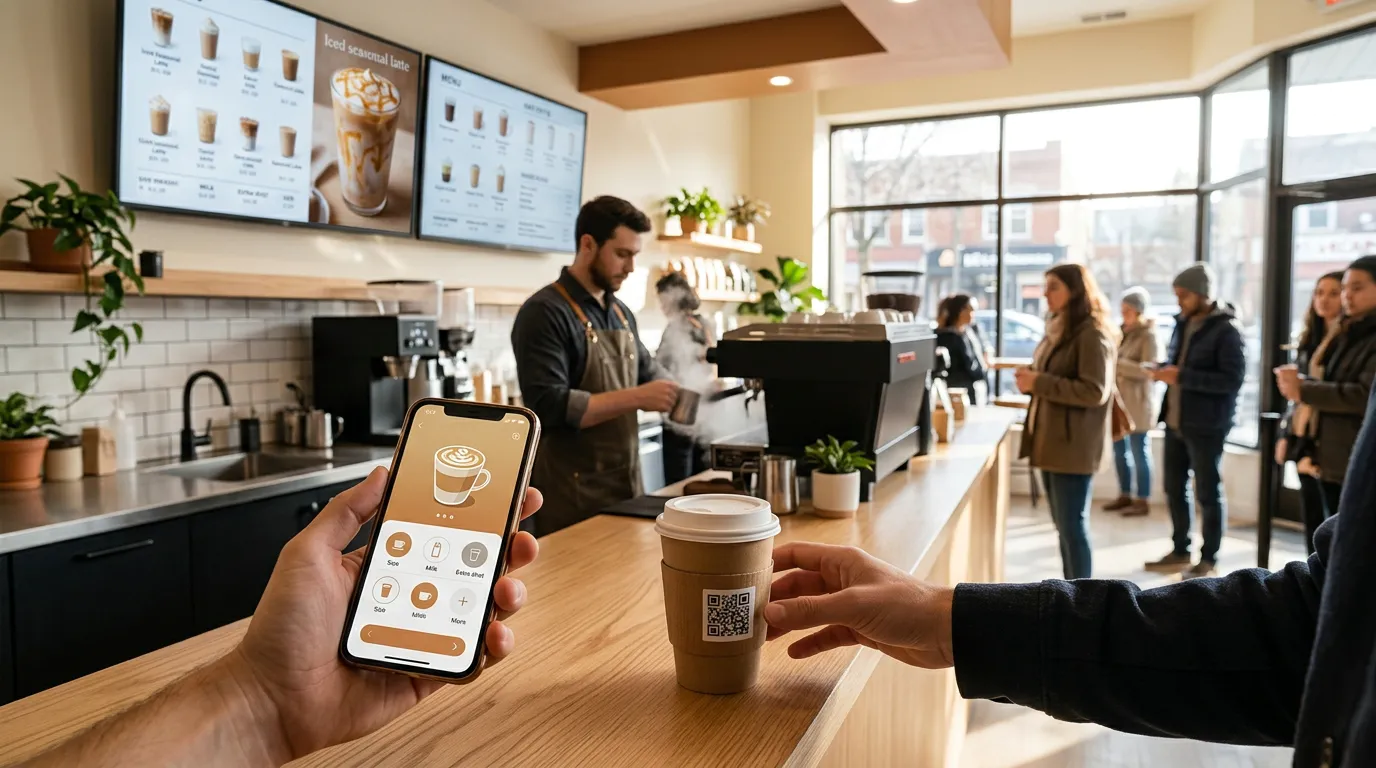
A good digital menu for a coffee shop makes those choices easier. A menu board shows customers what you offer while they wait, and QR ordering lets them build their exact drink on their phone without holding up the line.
Here's how coffee shops and cafés can use digital menus and QR ordering, and how to set them up.
Why Coffee Shops Benefit From Digital Menus
Coffee shops have a few challenges that make digital menus especially useful:
Lots of options. Sizes, milks, syrups, and add-ons multiply quickly.
Seasonal drinks. Fall flavors, holiday specials, and summer iced drinks come and go.
A morning rush. Most orders arrive in a short window.
Price changes. Coffee, milk, and ingredient costs shift often.
Customers who want speed. Many regulars order the same thing and just want it fast.
A printed menu can't keep up with all of that. A digital one can.
Use a Digital Menu Board Behind the Counter
A café menu board on a TV behind the counter is the first thing customers look at when they walk in.
It should help them decide quickly:
Group drinks clearly: espresso drinks, brewed coffee, tea, cold drinks, and seasonal specials.
Show sizes and prices in a simple grid rather than repeating them for every drink.
List add-ons once, like milk options and extra shots, instead of cluttering every item.
Feature one seasonal drink prominently, with a photo.
Keep it readable from the back of the line. If the menu is crowded, split it across two screens, one for drinks and one for food and pastries.
Our guide on how to create a digital menu board walks through the full setup.
Switch Menus Throughout the Day
Many coffee shops serve different things at different times: breakfast sandwiches in the morning, lunch items at midday, and afternoon treats later.
With Billiie Digital Signage, you can schedule your menu board by time of day. Your breakfast menu can show until 11 AM, then automatically switch to lunch. You can also set an end date for a seasonal drink, so it disappears from the board when the season ends.
That means no one has to remember to change the menu during a busy morning.
Promote Seasonal and Limited-Time Drinks
Seasonal drinks are some of a coffee shop's best sellers, and a screen is the perfect place to promote them.
A drink menu display can feature a large photo of your new seasonal latte, a short description, and the price. Rotate it with your regular menu so it catches attention without hiding everything else.
NEW: MAPLE OAT LATTE — HOT OR ICED
When the season ends, the promotion ends with it. No leftover posters, no outdated signs.
Add QR Ordering for the Morning Rush
Coffee shop QR ordering is where digital menus really save time.
Instead of reciting a complicated drink order at the counter, customers scan a QR code and build it on their phone: the drink, size, milk, syrups, extra shot, and a note like "extra hot." The order goes straight to your coffee station.
With Billiie Digital Menu Ordering:
Customers order from their phone's web browser, with no app to download.
You can create toppings, options, extras, and add-ons, perfect for milks, syrups, and shots.
Customers can add notes to each item.
A sound alert tells your baristas a new order has arrived.
Each order gets its own order number.
You mark the order ready, and the customer is notified it's time to pick up.
For regulars who order the same drink every day, that's a much faster experience than waiting in line.
Separate QR Codes for Drinks and Food
Many cafés have a coffee station and a separate food counter or kitchen.
Billiie Digital Menu Ordering lets you create multiple QR codes for different areas and send orders to the area of your choice. A drink order goes to the coffee station, and a breakfast sandwich goes to the kitchen.
You could also give catering or large office orders their own QR code, so a 20-coffee order doesn't land in the middle of the morning rush unannounced.
Where to Put QR Codes in a Coffee Shop
The best spots are where customers pause or wait:
On the counter by the register
Along the line
At the pickup area, so customers can order their next drink
On tables for customers who want a refill or a pastry
In the front window, so passersby can see your menu
On cup sleeves, bags, and receipts
Our guide on where to put QR code menus covers each of these in more detail.
Does QR Ordering Replace the Counter?
No, and it shouldn't.
Many coffee shop customers enjoy chatting with their barista, and some prefer to order in person. QR ordering simply gives customers another option, which takes pressure off the counter during the busiest times.
Our comparison of QR code ordering vs. phone orders explains how to offer both without slowing your team down.
Tips for Coffee Shop Digital Menus
Keep the core menu stable. Regulars like knowing where their drink is on the board.
Feature one special at a time. Too many promotions compete with each other.
Use photos for seasonal drinks and pastries. They sell better than text alone.
Make prices easy to find. A size-and-price grid is clearer than prices next to every drink.
Test it from the line. If you can't read it from the back, enlarge the text.
What Does It Cost?
Menu board: With Billiie Digital Signage, your first screen is free, forever. Each additional screen is $1 per month.
QR ordering: Billiie Digital Menu Ordering is $20 per month.
You'll also need a TV and a Fire TV Stick or compatible device for the menu board, if you don't already have them.
Make Mornings Easier
A coffee shop runs on speed and consistency. A digital menu board helps customers decide faster, and QR ordering lets them skip the line entirely.
For more ideas, see how restaurants and cafés use digital signage.
Create your Billiie account and set up your coffee shop's digital menu today.
Ready to bring Billiie to your business?
Manage your screens, content, and locations from one simple dashboard.
No commercial signage hardware neededPowered by Billiie