Popeyes Digital Menu Boards: How to Create a Fast-Food Style Menu for Your Restaurant
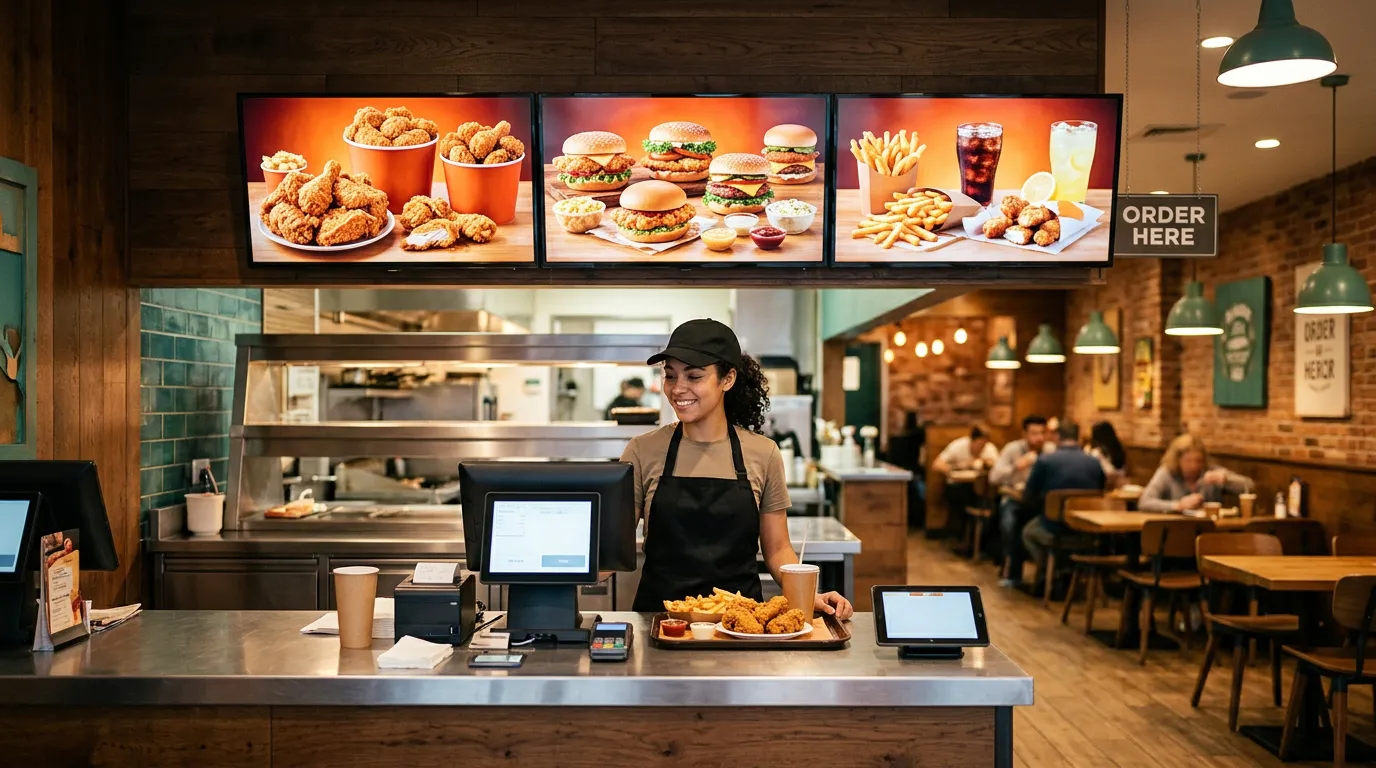
Walk into a Popeyes restaurant, and one of the first things you may notice is the digital menu boards displayed above the ordering counter. These screens showcase fried chicken meals, sandwiches, combo deals, sides, and promotions using colorful graphics and organized layouts.
For restaurant owners, the Popeyes digital menu board is a useful example of how digital displays can improve the appearance of a fast-food restaurant while making menus easier for customers to read.
But you don't need to operate a national restaurant chain to achieve a similar look.
Today, independent restaurants, fried chicken shops, burger joints, delis, and takeout businesses can create professional digital menu boards using affordable TVs and digital signage software.
In this guide, we'll explore how Popeyes-style digital menu boards work, what makes their designs effective, how much a similar setup can cost, and how restaurant owners can create their own digital menus without spending thousands of dollars.
What Is a Popeyes Digital Menu Board?
A Popeyes digital menu board refers to the electronic menu displays used in Popeyes restaurants to present food items, prices, meal combinations, and promotional offers.
Instead of relying entirely on printed menus, digital menu boards allow restaurants to display menu content on television screens or commercial digital displays.
Depending on the restaurant's setup, these Popeyes restaurant menu screens may feature:
Fried chicken meals and family bundles
Chicken sandwiches and combo meals
Side dishes and beverages
Limited-time promotions
Featured products and seasonal offers
Product photography and pricing
Digital menu boards have become a familiar part of the modern quick-service restaurant experience.
For customers, they provide an organized way to explore available meals before ordering. For restaurant operators, they offer greater flexibility than traditional printed signage.
Why Popeyes-Style Digital Menu Boards Stand Out
The effectiveness of a fast food digital menu board comes down to more than displaying food prices on a television.
Successful menu designs combine visual appeal, readability, branding, and strategic product placement.
1. Large, Appealing Food Photography
Food photography is one of the most noticeable elements of a modern fast-food Popeyes menu board.
Rather than displaying only text, restaurants can feature large images of their most popular meals.
For a fried chicken restaurant, this might include crispy chicken sandwiches, family meal bundles, chicken tenders, and combination platters.
High-quality food photography helps customers quickly recognize products and can draw attention to featured items.
Independent restaurants should use professional photographs of their actual food whenever possible. This helps set accurate expectations and gives the menu a more authentic appearance.
2. Organized Menu Categories
Popeyes-style menu boards demonstrate the value of organizing products into recognizable categories.
For example, a fried chicken restaurant might dedicate separate sections to sandwiches, chicken meals, family bundles, sides, and drinks.
This organization allows customers to locate what they want without searching through a crowded menu.
Restaurants with multiple screens can take this approach further by assigning different categories to individual displays.
3. Clear Prices and Combo Deals
Customers should be able to identify prices quickly, especially during busy lunch and dinner periods.
Digital menu boards can highlight combo meals, upgrades, and family bundles using larger text and contrasting colors.
For example, a restaurant might display a chicken sandwich prominently while positioning the corresponding combo meal beside it.
The goal is to make ordering simple while giving customers useful information about available options. Our menu board design tips cover layout, text size, and pricing in more detail.
4. Promotions and Limited-Time Offers
One major advantage of digital menu boards is the ability to change promotional content.
Restaurants can feature seasonal meals, lunch specials, new products, and limited-time offers without printing replacement signs.
Digital signage software with scheduling capabilities can also help businesses prepare promotional content in advance.
What TVs Are Used for Fast-Food Digital Menu Boards?
One of the most common questions restaurant owners ask is whether they need expensive commercial displays to create professional digital menus.
The answer depends on the restaurant's operating hours, environment, budget, and display requirements.
Commercial Digital Signage Displays
Commercial displays built for digital menu boards for restaurants are designed for business environments and may offer features such as:
Extended operating-hour ratings
Higher brightness options
Commercial warranties
Remote device management
Installation options for demanding environments
These displays can be useful for restaurants operating long hours or requiring specialized hardware.
However, commercial displays generally cost more than consumer televisions.
Regular Smart TVs
Many independent restaurants choose regular smart TVs for their digital menus.
Affordable 43-inch, 50-inch, and 55-inch televisions can provide attractive menu displays when paired with compatible digital signage software.
For example, a small fried chicken restaurant might install three 43-inch TVs above its ordering counter.
Each television could display a different menu category:
Screen 1: Chicken sandwiches and combo meals
Screen 2: Fried chicken, tenders, and family bundles
Screen 3: Sides, beverages, and promotional offers
This arrangement can create a professional fast-food-style menu without requiring specialized commercial hardware.
However, restaurant owners should consider TV ventilation, operating-hour limitations, warranty coverage, and compatibility before choosing consumer televisions. Our guide to commercial TVs vs. regular TVs explains the trade-offs.
How Much Does a Popeyes-Style Digital Menu Board Cost?
Creating a digital menu board setup similar in appearance to those found in major fast-food restaurants doesn't necessarily require a large investment.
The total cost depends on the number of screens, television sizes, installation requirements, content design, and digital signage software.
Here is an illustrative budget for an independent restaurant using three televisions.
| Item | Estimated cost |
|---|---|
| Three 43-inch smart TVs | $420–$750 |
| Three wall mounts | $60–$150 |
| Professional installation | $300–$600 |
| Custom menu designs | $100–$300 |
| Digital signage software | Varies by provider |
These are illustrative estimates, not Popeyes' actual equipment or installation costs. Electrical work, additional hardware, taxes, and other expenses may apply.
For many restaurants, the biggest expenses are the initial televisions, mounting hardware, and installation.
Once the screens are installed, digital menu board software determines how easily restaurant owners can update menus and how much they spend on ongoing subscriptions.
Some digital signage platforms charge several dollars or more per screen each month.
Others, such as Billiie, provide a more affordable option for small businesses. Our guide on how much digital signage costs breaks down the full picture.
How to Create a Digital Menu Board Like Popeyes
Restaurant owners interested in achieving a similar fast-food menu style can follow a straightforward process.
Step 1: Choose Your Television Screens
Start by measuring the available wall space above your ordering counter.
Consider how far customers will stand from the screens and how many menu categories you need to display.
For smaller restaurants, two or three televisions may be enough.
Larger restaurants with extensive menus may benefit from four or more displays.
Step 2: Organize Your Menu
Before creating any graphics, divide your food items into clear categories.
A fried chicken restaurant might organize its menu around sandwiches, combo meals, family buckets, sides, desserts, and drinks.
Avoid placing too many products on a single screen.
Customers should be able to read menu items and prices comfortably from the ordering area.
Step 3: Create Professional Menu Designs
Design your digital menu boards using a graphic design tool or work with a designer.
For a standard landscape television, a 1920 × 1080 design is a common starting point.
Use high-resolution food photography, consistent fonts, recognizable categories, and readable prices.
A Popeyes-inspired layout can provide design inspiration, but restaurants should use their own logos, colors, photography, and branding rather than copying another company's protected materials.
Step 4: Choose Digital Menu Board Software
Once your designs are ready, you'll need a way to display them on your televisions.
Digital menu board software allows businesses to upload content and manage what appears on their screens.
For example, Billiie digital signage software lets restaurant owners upload images and videos, assign content to individual screens, and manage their displays remotely.
This eliminates the need to manually replace USB drives whenever menu content changes. Our step-by-step guide on how to create a digital menu board walks through the setup.
Step 5: Schedule Promotions and Menu Changes
Restaurants frequently change prices, introduce specials, and advertise new products.
With scheduling features, owners can prepare content for specific dates and promotional periods.
For example, a restaurant could schedule a weekend family meal promotion or display a breakfast menu during morning hours.
Scheduling helps keep promotional content organized and reduces the need for manual screen changes.
Affordable Digital Menu Boards for Small Restaurants
Get 10 Digital Menu Screens for Just $10 a Month With Billiie
Large restaurant chains may have substantial budgets for restaurant digital signage, but independent restaurants often need a more affordable solution.
That's where Billiie comes in.
Billiie provides digital signage software designed to help businesses display menus, advertisements, promotions, and other content on compatible televisions.
Instead of paying expensive monthly software subscriptions, restaurant owners can start with one screen free, forever, then get 10 screens for just $10 a month.
| Plan | Monthly software cost |
|---|---|
| Your first screen | Free, forever (shows a small Billiie banner) |
| 10 screens | $10 |
With Billiie, restaurant owners can:
Upload their own digital menu designs
Display images and videos
Update content remotely
Schedule promotions and menu changes
Assign different content to different screens
Monitor screen connectivity
Manage multiple screens from one dashboard
Give team members access to help manage content
Whether you operate a fried chicken shop, pizzeria, deli, burger restaurant, or another quick-service business, Billiie makes it easier to manage digital menu content without expensive software. See how restaurants use digital signage for more ideas.
Popeyes-Style Digital Menu Boards vs. Traditional Printed Menus
Traditional printed menus remain useful for many restaurants, but digital menu boards offer additional flexibility.
| Feature | Digital menu boards | Printed menu boards |
|---|---|---|
| Update prices | Upload revised content | Reprint or replace signage |
| Display videos | Yes | No |
| Schedule promotions | With compatible software | Manual replacement |
| Display multiple designs | Yes | Limited |
| Remote updates | With compatible software | No |
| Initial equipment | TVs and mounting | Printed materials |
| Electricity required | Yes | No |
For restaurants that frequently update their menus, digital signage can simplify content management.
However, digital screens also introduce ongoing electricity costs, hardware maintenance, and software requirements.
The right choice depends on each restaurant's needs and budget.
Can Small Fried Chicken Restaurants Use Digital Menu Boards?
Absolutely.
Fried chicken restaurant digital menu boards are not limited to national chains such as Popeyes, KFC, or McDonald's.
Independent fried chicken restaurants can use the same general display concept to create a more organized ordering experience.
For example, a neighborhood chicken restaurant could install four televisions:
TV 1: Fried chicken meals and individual orders
TV 2: Chicken sandwiches, burgers, and combos
TV 3: Family meals and party specials
TV 4: Sides, beverages, and rotating promotions
The restaurant could then update its menu graphics remotely whenever prices or specials change.
With affordable software, even businesses operating on tight budgets can adopt digital menu technology.
Frequently Asked Questions About Popeyes Digital Menu Boards
What software does Popeyes use for digital menu boards?
Popeyes' exact digital menu board software provider may vary by market, franchise operator, or deployment. The current provider should be verified through official sources rather than assumed.
Independent restaurants do not need to use the same software as Popeyes to create professional digital menu boards. Platforms such as Billiie offer an alternative for managing menu content.
Can I create a digital menu board that looks like Popeyes?
Yes. Restaurants can use similar design principles, including large food photography, organized categories, readable pricing, and featured promotions.
However, businesses should create original designs using their own branding instead of copying Popeyes' logos or proprietary graphics.
Do I need a commercial TV for a restaurant digital menu board?
Not necessarily. Many restaurants can use compatible consumer smart TVs.
Commercial displays may be more appropriate for extended operating hours, high-brightness environments, or specialized installations.
How many digital menu boards does a restaurant need?
A small restaurant may only need one or two screens, while a larger fast-food restaurant may require three to six or more.
The ideal number depends on menu size, wall space, and customer viewing distance.
Can digital menu board prices be updated remotely?
Yes. With compatible digital signage software, restaurant owners can update the menu design displayed on their screens remotely.
Some systems also support integrations with point-of-sale platforms, although these integrations depend on the software provider and configuration.
How much does digital menu board software cost?
Pricing varies significantly between providers.
With Billiie, your first screen is free, forever, and after that you can get 10 screens for $10 a month.
Televisions, mounting, installation, design services, and any additional hardware are separate expenses.
Final Thoughts: Bring the Fast-Food Digital Menu Experience to Your Restaurant
The Popeyes digital menu board is an example of how fast-food restaurants can use digital displays to organize menus, showcase meals, and promote special offers.
But professional digital menu boards are no longer limited to major restaurant chains.
With affordable televisions, original menu designs, and the right digital signage software, independent restaurant owners can create attractive digital menus without making a major technology investment.
Whether you're opening a new fried chicken restaurant, upgrading an existing deli, or replacing outdated printed menus, digital signage can provide a flexible way to present your food and promotions.
Ready to turn your restaurant TVs into digital menu boards? Start with your first screen free, then get 10 screens for just $10 a month.
Ready to bring Billiie to your business?
Manage your screens, content, and locations from one simple dashboard.
No commercial signage hardware neededPowered by Billiie