Consumer TV vs. Commercial Display for Digital Signage: Which Do You Need?
One of the first decisions businesses face when setting up digital signage has nothing to do with software.
It's the screen.
Do you really need an expensive commercial display, or can you walk into a local electronics store, buy a regular smart TV, mount it on the wall, and use that instead?
The answer is:
It depends on how and where you're going to use it.
For many small businesses, a consumer television can work perfectly well for digital signage. For other environments—particularly screens operating for very long hours, high-brightness locations, large deployments, or installations where reliability is critical—a commercial display may be the better investment.
The mistake is assuming that one option is automatically right for every business.
This guide compares a consumer TV vs commercial display for digital signage based on the things that actually matter: price, operating hours, brightness, durability, warranties, installation, smart features, and the environment where the screen will operate.
By the end, you should have a much clearer idea of which type of screen makes sense for your business.
Consumer TV vs. Commercial Display: What's the Difference?
At first glance, a consumer television and a commercial display can look almost identical.
Both might be:
55 inches.
4K.
Wall-mounted.
Connected to Wi-Fi.
Displaying the exact same promotion.
The important differences are usually behind the screen.
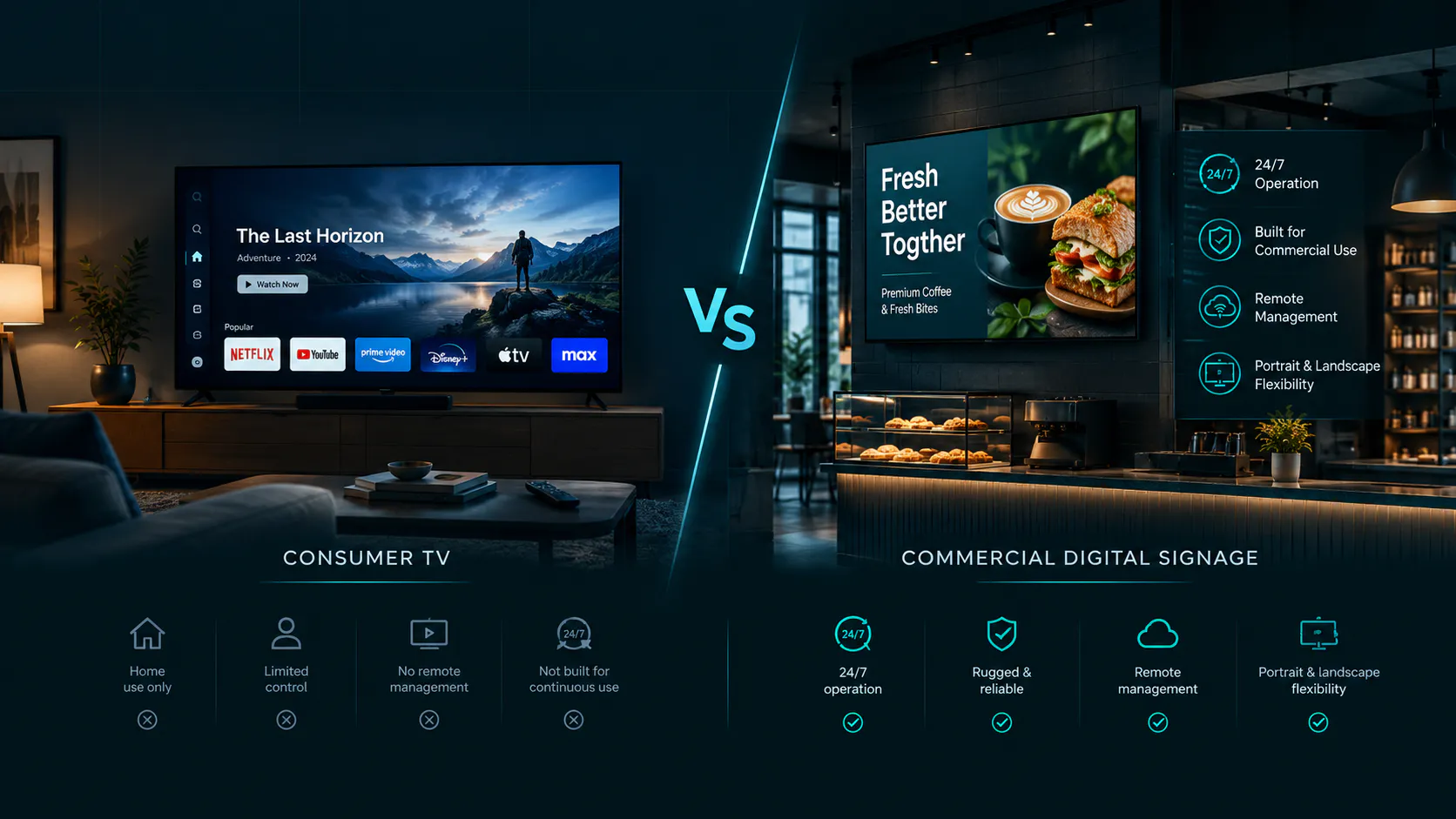
Consumer TVs are primarily designed for residential entertainment. Commercial displays are designed specifically for business environments and may be engineered for longer operating schedules, commercial warranties, centralized controls, higher brightness, portrait orientation, or continuous operation.
That doesn't mean a commercial display automatically produces a better digital sign.
It means the hardware is designed around a different workload.
When comparing a commercial TV vs consumer TV, businesses should focus less on the label and more on the actual requirements of the installation.
Can You Use a Regular TV for Digital Signage?
Yes—in many situations, you can use a regular TV for digital signage.
This is particularly true for small businesses operating indoors during normal business hours.
Consider a neighborhood deli.
The business opens at 7:00 AM and closes at 8:00 PM. It has three 50-inch TVs mounted behind the counter displaying menus.
Does that business automatically need three expensive commercial displays?
Not necessarily.
A good consumer smart TV may be completely reasonable for that environment.
The same can apply to:
Barbershops
Salons
Small retail stores
Offices
Small hotels
Real estate offices
The important thing is understanding the limitations of the hardware you're buying.
A consumer TV for digital signage should be selected based on the actual environment—not simply because it's the cheapest screen available.
What Is a Commercial Digital Signage Display?
A commercial digital signage display is a screen designed specifically for business or professional use.
Depending on the model, commercial displays may be rated for extended operation such as 16 hours per day, seven days per week—often described as 16/7—or continuous 24/7 operation.
They may also include features such as:
Higher brightness
Commercial warranties
Remote management capabilities
Portrait orientation support
Thinner bezels
Longer operating schedules
Business-oriented control settings
More robust cooling or thermal management
Professional connectivity options
Some commercial displays don't even include the television features consumers expect, such as built-in streaming services or TV tuners.
That's because they're not really televisions.
They're displays.
Their job is to show content reliably in a business environment.
Consumer TV vs. Commercial Display: Cost
For small businesses, price is often the biggest difference.
Consumer televisions benefit from an enormous retail market.
Major manufacturers sell millions of them, retailers compete heavily on price, and sales happen throughout the year.
It's not unusual to find a good 50- or 55-inch 4K smart TV at a relatively affordable price.
Commercial displays can cost considerably more.
But comparing purchase price alone doesn't tell the entire story.
Think About Total Cost, Not Just Purchase Price
Imagine two displays.
The first costs $250.
The second costs $700.
It's tempting to immediately call the $250 screen the better value.
But what if the screen needs to operate nearly 24 hours every day?
What if it's installed somewhere difficult to access?
What if downtime is particularly disruptive?
What if the manufacturer's warranty doesn't cover the way the screen is being used?
In that environment, paying more for commercial hardware may make sense.
Now consider a small barber shop that's open nine hours per day and wants one screen behind reception.
Spending hundreds of additional dollars for commercial hardware may provide little practical benefit.
The cheapest screen isn't always the cheapest solution—and the most expensive screen isn't automatically the best solution.
Operating Hours: 8/7, 16/7 and 24/7 Explained
This is one of the most important differences to understand.
Commercial displays are frequently marketed according to their intended operating schedule.
You may encounter specifications such as:
16/7 — designed for operation up to 16 hours per day, seven days per week.
24/7 — designed for continuous operation.
Consumer televisions generally aren't marketed around these commercial duty-cycle ratings.
That matters when choosing a TV for digital signage.
Normal Business Hours
Suppose a café operates from 8:00 AM until 6:00 PM.
That's roughly 10 hours per day.
A quality consumer television may be a reasonable choice depending on the model, environment, warranty terms, and other requirements.
Long Business Hours
Now consider a convenience store operating 18 hours every day.
The screen has a substantially heavier workload.
A commercial display rated for extended daily operation becomes more attractive.
24-Hour Businesses
A screen expected to operate continuously should be selected specifically for that workload.
This is where a 24/7 digital signage display can be worth the additional investment.
Don't assume a consumer television is designed for continuous commercial operation simply because it's technically possible to leave it turned on.
Always check the manufacturer's specifications and warranty terms for the specific model.
Brightness and Visibility
A screen can have beautiful picture quality and still make terrible signage if nobody can see it.
Brightness matters.
But more brightness isn't automatically necessary.
Typical Indoor Environments
Restaurants, waiting rooms, offices, salons, and many retail stores operate under controlled indoor lighting.
A typical consumer television may provide sufficient visibility in these environments.
Bright Indoor Locations
A storefront with large windows is different.
Direct or strong ambient light can make a screen appear washed out.
This is where a brighter commercial display for digital signage may offer a meaningful advantage.
Outdoor Signage Is Different
Do not assume an indoor consumer TV or standard commercial display can simply be mounted outdoors.
Outdoor installations introduce sunlight, heat, cold, moisture, dust, weather protection, and much higher brightness requirements.
Use hardware specifically rated for the intended environment.
Screen Lifespan and Durability
Businesses often ask:
Which lasts longer: a commercial display or a consumer TV?
There's no universal number that applies to every model.
Screen technology, operating hours, brightness settings, temperature, ventilation, panel quality, power cycles, and the installation environment can all affect longevity.
Commercial hardware is generally designed around business use and may be engineered for heavier operating schedules.
But that doesn't mean every consumer television will fail quickly.
Many businesses use consumer TVs successfully for years.
The better question is:
How demanding is the environment?
A television running eight hours per day in an air-conditioned office has a very different workload from a screen operating around the clock in a high-traffic commercial environment.
Warranty and Business Use
This is an area businesses sometimes overlook.
Before purchasing a consumer television for a commercial installation, review the manufacturer's warranty.
Don't assume a residential warranty provides the same coverage when a television is installed in a business.
Commercial displays may include warranties designed around professional use.
For one inexpensive screen, this distinction may not heavily influence the purchasing decision.
For an organization deploying 100 screens, it becomes much more important.
Replacing one failed $250 television is an inconvenience.
Managing failures across a large network is an operational problem.
The larger the deployment becomes, the more important support, warranty terms, standardized hardware, and replacement planning become.
Smart TV Features and Connectivity
Here's one area where consumer TVs can be particularly attractive.
Modern smart TVs often include:
Wi-Fi
Ethernet on some models
HDMI
USB
Fire TV
Google TV
Other smart-TV operating systems
That can simplify digital signage installations.
Depending on the signage platform and television, a business may be able to use the TV's existing smart operating system rather than automatically adding another external device.
That's one reason a smart TV for digital signage can make sense for smaller deployments.
Do You Need a Media Player?
Not always.
Some digital signage systems require external media players.
Others can operate directly on compatible smart-TV platforms.
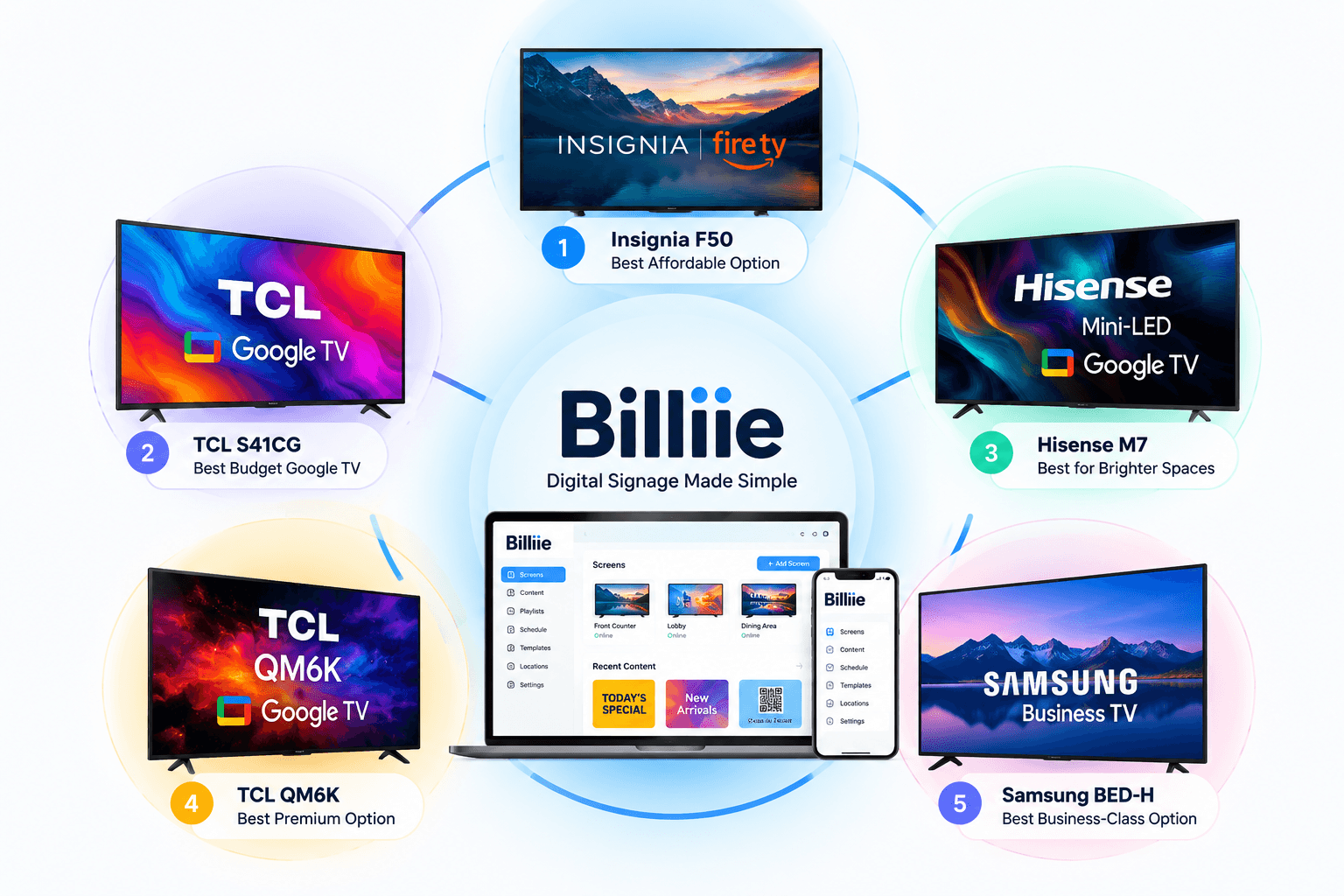
Before purchasing hardware, determine what your signage software actually requires. (Here's which TVs and devices work with Billiie.)
Don't buy an additional device simply because you assume every digital signage installation needs one.
At the same time, don't assume every smart TV supports every signage application.
Check compatibility first.
Consumer TV Power Settings Can Cause Problems
One of the biggest problems with using a consumer television for signage has nothing to do with picture quality.
It's power management.
Consumer TVs are designed for people watching television at home.
They may include:
Sleep timers
Screensavers
Automatic power-saving modes
Auto shutdown
"Still watching?" prompts
Those features can interrupt signage.
Imagine arriving at your restaurant during lunch and discovering that one of your menu screens has turned itself off.
The TV isn't broken.
A setting simply wasn't configured correctly.
Before using a digital signage TV, review its power, sleep, screensaver, and energy-saving settings.
Then test the screen through a complete business day.
Portrait Orientation Can Change the Decision
Most consumer televisions are designed to sit horizontally.
Commercial signage displays are more likely to explicitly support both landscape and portrait installation.
That's important.
If you're installing a standard horizontal menu board, this may not matter.
If you're creating a tall vertical directory, advertising display, or storefront sign, it can matter significantly.
Don't simply rotate a consumer television 90 degrees without checking whether the manufacturer supports that orientation.
Cooling and ventilation may have been designed around horizontal installation.
If vertical signage is central to your deployment, a commercial display designed for portrait operation may be the safer choice.
When a Consumer TV Makes More Sense
There are plenty of situations where a consumer TV or commercial display for digital signage decision doesn't need to be complicated.
A consumer TV can make sense when:
The screen is indoors.
Operating hours are moderate.
The environment has normal indoor lighting.
The screen is easy to access and replace.
The budget matters.
You only need a few displays.
Landscape orientation works.
The television supports your signage setup.
The manufacturer's specifications are appropriate for the intended use.
For many small businesses, that's the reality.
Example: Neighborhood Restaurant
Imagine a restaurant needs four menu screens.
A commercial-display installation might significantly increase the upfront hardware cost.
If the restaurant operates normal hours in a climate-controlled environment and the screens are easy to access, compatible consumer TVs may be a reasonable option.
The restaurant can put more of its budget toward the actual menu design, installation, mounts, or other parts of the business.
When a Commercial Display Makes More Sense
There are also environments where paying more for commercial hardware is easier to justify.
Consider a commercial display for digital signage when:
The screen needs to operate for very long hours.
24/7 operation is required.
The installation is difficult or expensive to access.
High brightness is necessary.
Portrait orientation is required.
The environment is demanding.
Commercial warranty coverage is important.
The organization manages a large number of screens.
Downtime would create a significant operational problem.
Example: Large Multi-Location Operation
Imagine a company operating 200 screens across 40 locations.
Hardware failure isn't simply about buying another television.
Someone may need to diagnose the problem, order a replacement, travel to the location, remove the old display, install the new one, configure it, and verify everything is working.
In that environment, hardware reliability and standardization can become more important than saving $200 on the initial purchase.
Scale changes the calculation.
Restaurants: Consumer TV or Commercial Display?
Restaurants are one of the most common environments for digital menu boards.
For many independently owned restaurants, delis, cafés, pizza shops, and takeout businesses, consumer TVs can be practical.
They're affordable, widely available, and available in useful sizes such as 43, 50, 55, and 65 inches.
However, consider a commercial display when the restaurant operates extremely long hours, screens are difficult to access, or the displays are part of a large standardized rollout.
The right digital signage TV for restaurants depends on the operating environment.
Not the word "restaurant."
Retail Stores: Think About Brightness and Placement
Retail environments vary enormously.
A small boutique with controlled lighting may have modest screen requirements.
A storefront display facing large windows may require significantly more brightness.
A large retail chain may prioritize standardized commercial hardware because managing thousands of screens changes the economics.
Again, there isn't one universal best display for digital signage.
There is a best display for a particular installation.
Gyms: Think About Operating Hours
Gyms can be good candidates for consumer TVs because many already use televisions throughout the facility.
But operating hours deserve attention.
A gym open from 6:00 AM until 10:00 PM creates a heavier daily workload than an office operating from 9:00 AM until 5:00 PM.
A 24-hour gym creates an entirely different requirement.
Before choosing hardware, calculate how many hours per day the screen will actually operate.
That number can tell you more than the industry name.
Waiting Rooms and Offices
Waiting rooms and offices are often among the easier environments for consumer digital signage.
Lighting is generally controlled.
Operating hours are predictable.
Displays are usually indoors.
Screens may also be easy to access.
For many of these installations, an affordable TV for digital signage may make more economic sense than commercial hardware.
But again, check the individual television's specifications, warranty, compatibility, and intended usage.
Do Small Businesses Really Need Commercial Displays?
Not always.
This is one of the most important conclusions of the entire comparison.
Digital signage can sound unnecessarily expensive when every small business is told it needs:
A commercial display.
A dedicated media player.
Specialized hardware.
Professional infrastructure.
Enterprise software.
For some installations, all of those things may be appropriate.
For others, they're excessive.
A small business may already own a compatible television.
Another might purchase a reasonably priced smart TV.
If that hardware meets the environment's requirements, there is little value in making the installation more complicated simply because commercial signage can be complicated.
That's why digital signage hardware requirements should be determined after understanding the use case.
Not before.
Commercial TV vs. Regular TV for Business: Quick Comparison
Initial cost — Consumer TV: usually lower · Commercial display: usually higher
Designed primarily for — Consumer TV: home entertainment · Commercial display: business/professional use
Smart TV features — Consumer TV: common · Commercial display: depends on model
Extended operating ratings — Consumer TV: less commonly specified · Commercial display: common
24/7 models — Consumer TV: uncommon · Commercial display: available
Commercial warranty — Consumer TV: may be limited · Commercial display: more commonly available
High-brightness options — Consumer TV: limited · Commercial display: more options
Portrait support — Consumer TV: model dependent · Commercial display: common on signage models
Easy retail availability — Consumer TV: excellent · Commercial display: more specialized
Best fit — Consumer TV: many normal indoor installations · Commercial display: demanding or extended-use installations
This table is a general comparison.
Specific capabilities vary considerably by manufacturer and model, so always verify specifications before purchasing.
How to Choose the Right TV for Digital Signage
Instead of starting with a brand, start with the installation. Our guide to choosing the right TV or display for Billiie covers compatible brands, sizes, and connection options.
Ask these questions.
1. How Many Hours Per Day Will It Run?
Eight hours?
Twelve?
Sixteen?
Twenty-four?
Operating time should be one of your first filters.
2. How Bright Is the Environment?
A waiting room and a sunlit storefront aren't the same.
3. How Far Away Will People Be?
Viewing distance affects both screen size and content design. See how to choose the right placement for where screens get the most attention.
4. Landscape or Portrait?
Check whether the display officially supports the orientation you intend to use.
5. How Difficult Is the Screen to Replace?
A television mounted six feet behind a deli counter is easier to replace than a large display installed high above a lobby.
6. What Does the Warranty Cover?
Read the warranty rather than assuming.
7. Does It Work With Your Signage Software?
Compatibility matters more than impressive specifications you don't need.
Don't Overspend on Specifications Your Business Doesn't Need
It's easy to compare TVs the same way people compare cars.
More brightness.
Higher refresh rate.
Better processor.
More advanced panel.
More features.
But digital signage has a job to do.
If the screen is displaying a static breakfast menu inside a deli, you probably don't need the same specifications someone wants for a premium home theater.
On the other hand, a high-end retail showroom displaying detailed promotional video may benefit from better picture quality.
Buy for the content and environment.
Not the specification sheet.
Your Content Matters as Much as Your Screen
A $2,000 commercial display cannot rescue a bad design.
If the text is too small, customers still won't read it.
If there are 30 menu items squeezed into one tiny section, the screen won't fix the layout.
If the promotion has poor contrast, increasing the hardware budget won't solve the fundamental problem.
Good digital signage requires both suitable hardware and suitable content.
Design for the actual viewing distance.
Use large text.
Keep important information clear.
Use the correct resolution and orientation.
And test the finished design on the actual screen before deciding it's ready.
How Billiie Works With Your Digital Signage Screens
Billiie is designed to keep the software side of digital signage straightforward.
You create your finished image or video using your preferred design software or designer.
Then:
Create → Upload → Assign → Schedule → Display
Upload the finished content to Billiie, select the appropriate screen, choose when it should display, and manage your screens remotely.
Billiie does not require businesses to create or edit their graphics inside the platform.
That separation is useful because your screen choice and your content-creation tools don't need to dictate how you manage the signage network.
Businesses can start with a compatible screen that fits their needs and expand their setup as they grow.
Digital signage with Billiie starts at $1 per screen per month, with no minimum number of screens, no contracts, and the ability to cancel anytime.
One screen can be enough to start — create your Billiie account and power your first screen.
Consumer TV vs. Commercial Display: Which Should You Buy?
For many small businesses operating indoors during normal hours, a quality consumer television can be a sensible and affordable starting point.
For businesses requiring extended operating hours, continuous 24/7 use, higher brightness, commercial warranty coverage, portrait installations, or large standardized deployments, a commercial digital signage display may justify the additional cost.
Neither answer is automatically correct.
That's the point.
Don't buy a commercial display simply because someone says "real digital signage" requires one.
And don't buy the cheapest consumer television simply because it saves money today.
Look at:
Operating hours.
Environment.
Brightness.
Orientation.
Warranty.
Replacement difficulty.
Number of screens.
Software compatibility.
Then make the decision.
Final Thoughts: Buy the Screen Your Environment Actually Needs
The debate over commercial display vs consumer TV is often presented as though one side has to win.
It doesn't.
A local restaurant using three TVs for 10 hours per day has different requirements from an airport operating hundreds of displays around the clock.
A dental waiting room isn't a shopping-mall storefront.
A 24-hour gym isn't a nine-to-five office.
The right best TV for digital signage is therefore not necessarily the most expensive display.
It's the screen that reliably handles the environment where you're going to use it without forcing you to pay for capabilities you don't need.
For many small businesses, that may be a consumer smart TV.
For demanding installations, it may be a commercial display.
Understand the job first.
Then buy the hardware.
Affordable. Digital. Simple.
Editorial Note: This article is for informational and educational purposes only. Display specifications, duty-cycle ratings, warranty terms, supported orientation, brightness, commercial-use policies, pricing, software compatibility, and operating requirements vary by manufacturer and model. Always review the manufacturer's current specifications and warranty terms before purchasing or installing a display for commercial digital signage.
Ready to bring Billiie to your business?
Manage your screens, content, and locations from one simple dashboard.
No commercial signage hardware neededPowered by Billiie