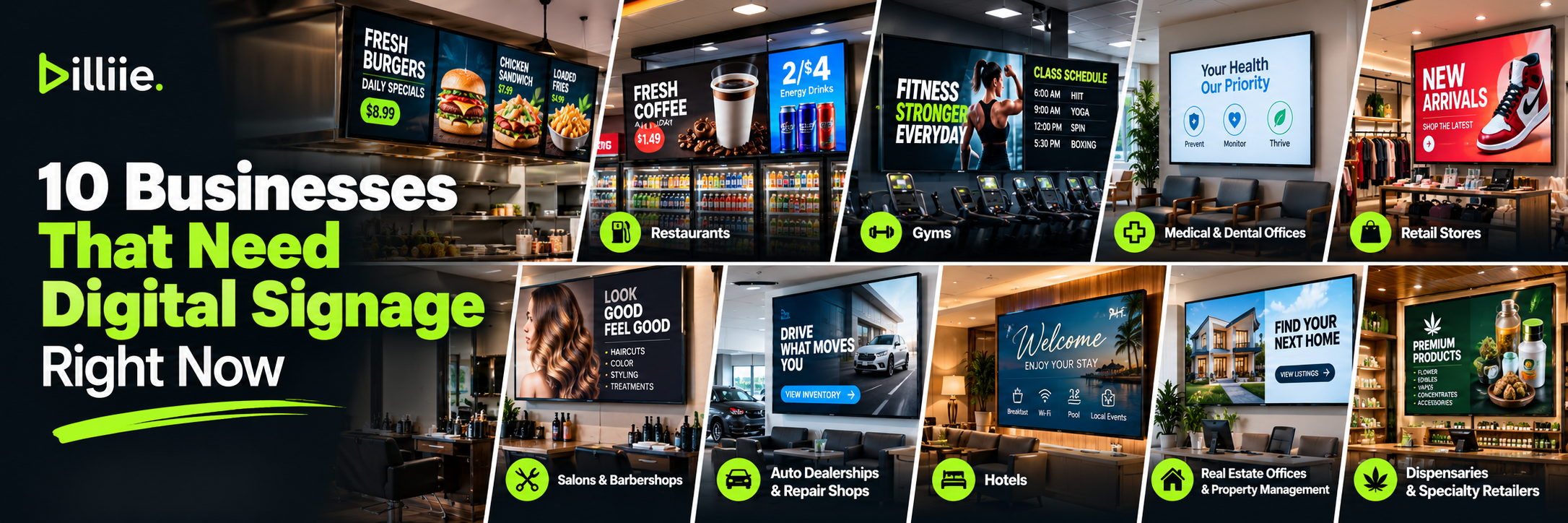
10 Businesses That Need Digital Signage Right Now
Walk into almost any business and you'll probably find a television somewhere.
The question is: what is that screen doing for the business?
In many locations, the answer is surprisingly little.
A television behind a counter may be showing regular TV programming. A waiting-room screen might be playing a news channel. A retail store may have a blank television that was installed years ago and never developed into anything useful.
Meanwhile, that same screen could be displaying a menu, promotion, class schedule, announcement, QR code, new product, service, or other information relevant to customers.
That's why many businesses that need digital signage aren't necessarily businesses that need to buy more screens. Many already have screens. They simply need to use them more effectively.
Modern digital signage for businesses can be particularly useful because businesses no longer necessarily need complicated proprietary hardware just to put content on a television. Depending on the setup, a compatible smart TV and digital signage software may be enough to get started.
But digital signage isn't equally useful everywhere.
The businesses that benefit most tend to have physical locations where customers wait, shop, order, exercise, browse, check in, or make purchasing decisions.
Here are 10 types of businesses where digital signage can solve a real communication problem.
1. Restaurants, Delis & Cafés
Restaurants are one of the clearest examples of businesses that use digital signage because menus already need to be displayed.
The traditional solution is a printed menu board.
That works—until prices change, an item sells out, a new special launches, or the restaurant wants to reorganize the menu.
Using digital signage for restaurants allows restaurants, delis, cafés, pizza shops, and other food businesses to display finished digital menus, daily specials, promotions, QR codes, and announcements across one or multiple screens.
Instead of trying to fit an entire menu onto one display, a deli could dedicate one screen to breakfast, another to sandwiches, another to salads, and another to drinks.
This gives customers more room to read item names and prices from where they actually order.
What Restaurants Can Display
Screens can be used for:
Digital menus
Breakfast menus
Lunch specials
Combo offers
New items
Catering services
Desserts
Drinks
QR codes
Restaurant announcements
A deli with five televisions doesn't necessarily need five identical menus.
One screen could display breakfast.
Two could display sandwiches and wraps.
Another could promote smoothies.
The final screen could rotate specials, catering, or promotions.
Where Restaurant Screens Work Best
Placement depends on how customers order.
Common locations include behind the counter, above ordering stations, near checkout, in waiting areas, facing storefront windows, and near pickup areas.
The most important factor is viewing distance.
If customers order from 15 or 20 feet away, the menu needs to be readable from that distance—not just from the laptop where it was designed.
Restaurants are a strong example of how digital signage for small businesses can serve an operational purpose rather than simply being decoration.
2. Gas Stations & Convenience Stores
Convenience stores have something many businesses would love to have:
Frequent customer traffic and a large number of purchasing decisions happening in a relatively small space.
A customer may enter planning to buy gasoline and leave with a drink, snack, sandwich, coffee, or several additional products.
That makes convenience stores a natural environment for business digital signage.
Using digital signage for gas stations can be particularly useful around beverage coolers, coffee stations, food counters, entrances, and checkout areas.
Where Screens Can Be Installed
Digital screens can work:
Above beverage coolers
Behind checkout
Near coffee stations
Above food counters
Near entrances
Around high-traffic aisles
The screen's purpose should depend on its location.
A display above a cooler could promote beverages.
A screen beside a food counter could show a menu.
A checkout display could highlight a limited-time special.
Don't Make Every Screen Identical
One of the advantages of having multiple screens is the ability to give them different jobs.
A convenience store doesn't necessarily benefit from showing the same soda advertisement on every TV.
Think about what the customer is doing in each area.
Digital signage ideas for businesses become much more effective when the message matches the customer's immediate surroundings.
3. Gyms & Fitness Centers
Gyms have an interesting advantage for digital signage:
Members spend a lot of time inside the business.
A restaurant customer may stay for 20 minutes. Someone at a gym might stay for an hour or longer.
That gives fitness facilities multiple opportunities to communicate without needing to put everything on one screen.
What Gyms Can Display
Gym screens can show:
Class schedules
Membership promotions
Personal training
Facility announcements
Upcoming events
Gym challenges
QR codes
Guest passes
Referral programs
New equipment announcements
Placement can include reception areas, cardio sections, studio entrances, lounges, or other high-traffic areas.
Match the Message to the Area
A membership upgrade near reception makes sense.
A personal-training promotion near the strength-training area makes sense.
A class schedule outside the studio makes sense.
Good digital signage examples for businesses aren't just about attractive graphics. They're about matching the message to the environment.
4. Medical & Dental Offices
Waiting rooms are built around one unavoidable fact:
People wait.
That makes medical and dental offices another strong environment for digital displays.
Instead of using the waiting-room television only for regular programming, practices can display useful general information.
Waiting-Room Content Ideas
Examples include:
Office hours
General health education
Dental-care tips
Available services
Office announcements
Seasonal reminders
QR codes
Frequently asked questions
General wellness information
A dental office could rotate simple educational questions such as:
How long should you brush your teeth?
The answer could appear on the following slide.
This gives waiting-room content a purpose beyond advertising.
Keep Privacy in Mind
Healthcare environments require additional consideration.
Public waiting-room displays should generally be used for broad information rather than displaying identifiable patient information.
Names, diagnoses, appointments, or other protected information shouldn't simply be placed on a public screen without appropriate privacy and compliance processes.
For this type of environment, the value of digital signage solutions for small businesses is primarily general communication, education, and office information.
5. Retail Stores
Retail is another obvious candidate because customers are already inside the location to discover and purchase products.
Yet many stores still rely almost entirely on printed posters.
Digital displays can complement—not necessarily replace—traditional signage.
What Retail Stores Can Promote
Screens can feature:
New arrivals
Seasonal products
Limited-time offers
Product demonstrations
Sales
Loyalty programs
Store events
QR codes
Brand campaigns
Customer reviews
Placement can include entrances, product departments, checkout areas, end caps, and high-traffic sections.
Use Movement Strategically
Retailers have another option that printed signs don't provide: motion.
Short video clips can demonstrate a product or show it being used.
But movement should have a reason.
A flashing animation isn't automatically more effective than a clear static promotion.
The goal of digital signage screens for business should always be communication first.
6. Salons & Barbershops
Salons and barbershops combine two characteristics that make digital signage useful:
Customers spend time waiting, and the business usually offers several services or products.
A screen can help communicate both.
What Salons Can Display
Possible content includes:
Service menus
Haircut pricing
Premium services
Before-and-after work
Products
Special offers
Appointments
Social media
QR codes
Customer reviews
A barber could show haircut styles while a customer waits.
A salon could rotate examples of coloring work.
A nail salon could show different services or designs.
This is a good example of affordable digital signage for small businesses because one strategically positioned television may be enough to create value.
You don't necessarily need a wall full of screens.
7. Auto Dealerships & Repair Shops
Automotive businesses have two very different digital signage opportunities.
Dealerships can use screens to support sales.
Repair shops can use them to improve waiting areas and promote services.
Dealership Digital Signage
A dealership might display:
Featured vehicles
New arrivals
Financing information
Service promotions
Accessories
Trade-in information
Customer reviews
Repair-Shop Digital Signage
An auto repair shop might focus on:
Oil-change offers
Tire services
Seasonal maintenance
Inspection reminders
Brake services
General vehicle-care information
Waiting areas are particularly valuable because customers may be sitting there for an extended period.
Instead of showing unrelated television programming for an hour, the business can use part of that attention to communicate relevant services.
8. Hotels
Hotels have numerous communication points because guests move through different areas of the property.
The lobby alone can require a surprising amount of information.
Hotel Digital Signage Ideas
Screens can display:
Breakfast hours
Check-in information
Wi-Fi instructions
Hotel amenities
Events
Meeting-room information
Local attractions
Restaurant hours
Pool hours
Checkout information
Directions
Larger properties can use different screens for different areas.
A conference-area display doesn't need the same content as the breakfast area.
A lobby screen may need different information from an elevator-area display.
This is where digital signage software for small businesses and larger hospitality operations becomes valuable: content can be organized by screen rather than treating every television as one network showing identical information.
9. Real Estate Offices & Property Management
Real estate is visual by nature.
People want to see properties.
That makes screens useful in real estate offices, leasing centers, building lobbies, and property-management environments.
Real Estate Office Displays
A real estate office could show:
Featured listings
Recently listed properties
Open houses
Recently sold homes
Agent information
Neighborhood information
QR codes leading to listings
Instead of filling a window with dozens of printed sheets, a screen can rotate selected properties.
Property Management Screens
Apartment buildings and managed properties have different needs.
Lobby displays can communicate:
Building announcements
Maintenance notices
Events
General reminders
Amenities
Management contact information
Again, the important point is relevance.
Residents shouldn't have to watch a sales advertisement when what they really need is tomorrow's elevator-maintenance notice.
10. Dispensaries & Specialty Retailers
Specialty retailers often carry a large number of products, categories, brands, and promotions.
That can make printed signage difficult to maintain.
Dispensaries are a good example. New products arrive, brands run promotions, inventory changes, and vendors may want their products featured throughout the store.
Digital signage for dispensaries can be used for digital menus, product categories, permitted brand promotions, new arrivals, store information, QR codes, and vendor content.
Screens might be positioned behind the counter, near product areas, at checkout, or throughout the sales floor.
A dispensary could dedicate individual screens to particular purposes: one for the store menu, another for new products, another for promotions, and another for vendor content.
Give Vendors Access to Their Own Screens
This becomes especially interesting when vendors are involved.
Instead of requiring store employees to handle every piece of promotional content, a dispensary using Billiie can assign management of a specific screen to a vendor.
The vendor can upload its own finished promotional content to the screen it has been assigned.
That allows the store to create dedicated promotional opportunities without handing over management of every display in the location.
The broader principle also applies to specialty retailers with large catalogs or frequently changing promotions: use screens to organize information instead of covering every available wall with printed material.
Businesses selling regulated or age-restricted products should ensure their displays and advertising comply with applicable requirements.
What Do These 10 Businesses Have in Common?
At first glance, a dentist's office doesn't have much in common with a gas station.
A gym doesn't operate like a hotel.
A barbershop isn't a car dealership.
But from a signage perspective, these businesses share something important:
They have physical locations where people spend time and make decisions.
That is where digital signage becomes useful.
The businesses that benefit from digital signage usually have one or more of these characteristics:
Customers wait.
Customers browse.
Customers order.
Customers need information.
The business frequently runs promotions.
Information changes regularly.
There are multiple products or services to explain.
The business has several physical locations.
Those characteristics create natural opportunities for screens.
You May Already Have the Hardware You Need
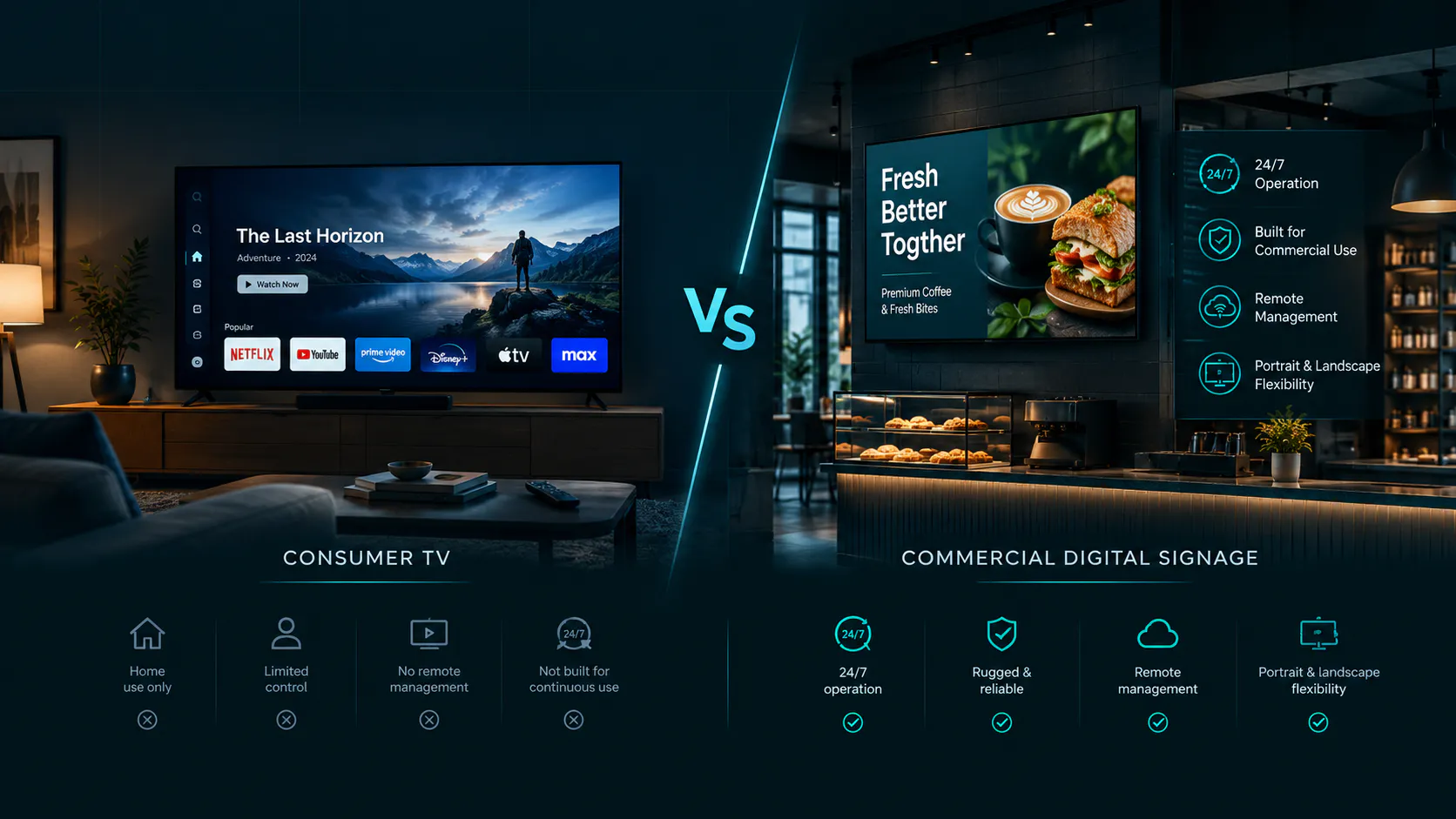
A common misconception is that getting started with digital signage requires buying expensive proprietary displays.
Sometimes commercial displays are absolutely the right choice.
But not every small business requires one.
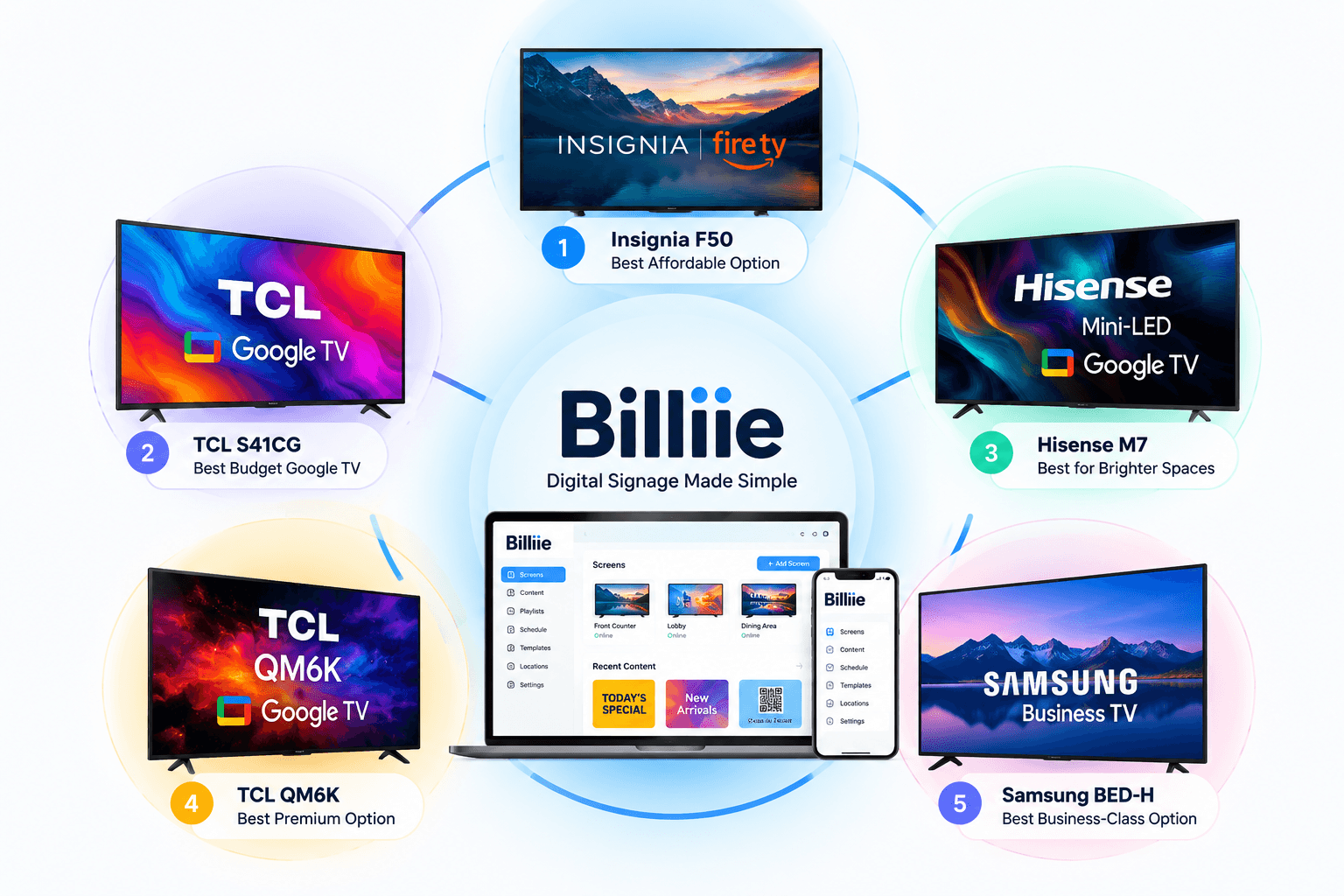
Many businesses already have compatible smart TVs or can purchase consumer smart TVs for normal indoor use.
The right choice depends on operating hours, brightness, screen location, workload, and the environment.
If a business already has suitable televisions, the initial hardware cost can be significantly lower than expected.
That changes the economics of digital signage for small businesses.
Instead of asking:
"Can I afford a digital signage system?"
The better question may be:
"Can I use the screens I already have more effectively?"
One Screen Is Enough to Start
Another misconception is that digital signage only makes sense when a business has a large network of screens.
It doesn't.
A barbershop might need one.
A small dental office might need one.
A neighborhood café might start with two.
A large restaurant might use five.
A multi-location retailer could eventually manage hundreds.
The number should follow the business need.
Don't install eight TVs simply because eight TVs look impressive.
Start with the areas where a screen can solve an actual communication problem.
Then expand if additional screens make sense.
Where Should a Business Put Digital Signage?
Before mounting anything, walk through the business from the customer's perspective.
Ask:
Where do customers enter?
Where do they wait?
Where do they look?
Where do they order?
Where do they make purchasing decisions?
Where do they spend the most time?
Those answers will usually identify the best screen locations.
A beautiful display in a location nobody looks at has little value.
Think About Viewing Distance
Placement also affects design.
A checkout screen viewed from five feet away can contain more detail than a menu board that needs to be read from 20 feet away.
The farther the viewing distance, the simpler and larger the important content should generally become.
Always test a design on the actual screen.
Don't judge it exclusively from a computer monitor.
Don't Turn Every Screen Into an Advertisement
Digital signage can promote products.
But promotion shouldn't automatically be the only purpose.
Some of the most useful screens provide information:
Class schedules.
Office announcements.
Menus.
Directions.
Hours.
Educational content.
Pickup instructions.
Events.
A screen becomes more valuable when customers learn that looking at it gives them something useful.
Then promotional content can be mixed naturally into the rotation.
This is one of the most important digital signage ideas for businesses because it changes signage from constant advertising into a communication channel.
Managing Multiple Screens Doesn't Have to Be Complicated
The challenge changes as a business grows.
With one television, it's usually obvious who manages it.
With 20 screens across several locations, it isn't.
Who uploads the new promotion?
Which screens should receive it?
Who manages Location 3?
Is the screen at Location 5 even online?
A good digital signage software for small businesses should make those questions easier to answer.
With Billiie, businesses can upload finished images and videos, assign content to screens, schedule when content appears, use different screen layouts, monitor screen status, and assign screens to team members.
The finished designs are created externally using the business's preferred designer or design software.
Billiie doesn't function as an in-platform graphic editor.
The workflow is intentionally straightforward:
Create → Upload → Assign → Schedule → Display
Affordable Digital Signage for Small Businesses
Digital signage used to sound like something designed primarily for airports, shopping malls, stadiums, and major retail chains.
That has changed.
Smart TVs are widely available.
Businesses already have internet connections.
Cloud-based signage software has made remote screen management much more accessible.
A small business doesn't necessarily need an enterprise-sized budget or IT department to operate a few screens.
Billiie is built around that idea.
Digital signage starts at $1 per screen per month, with no minimum number of screens, no contracts, and the ability to cancel anytime.
Start with one screen if that's what the business needs.
Add more when they make sense.
The technology should scale with the business rather than forcing the business to purchase a large system before it needs one.
Which Businesses Need Digital Signage Most?
There isn't one industry that automatically needs digital signage more than every other.
A better way to evaluate it is to look at the communication problem.
If customers repeatedly ask the same questions, a screen may help.
If menus or promotions change frequently, a screen may help.
If customers spend time waiting, a screen may help.
If employees constantly need to explain services, a screen may help.
If a business operates several locations and needs consistent communication, screens may help.
If printed posters are constantly being replaced, digital displays may be worth considering.
That's a more useful way to identify what businesses need digital signage than simply choosing an industry from a list.
Final Thoughts: Your TV Should Be Working for Your Business
Look around your location.
If there's already a television on the wall, ask yourself one simple question:
What is this screen doing for the business right now?
If it's displaying something useful, great.
If it's turned off, showing unrelated programming, or displaying the same outdated graphic for six months, there's probably an opportunity to use it better.
Restaurants can display menus.
Gyms can communicate class schedules.
Medical offices can provide useful waiting-room information.
Retailers can promote new products.
Hotels can guide guests.
Barbers can show services.
Real estate offices can showcase listings.
The exact content changes by industry, but the underlying principle stays the same.
The strongest business digital signage has a purpose.
It communicates something customers need to know, want to know, or might find useful at the moment they're looking at the screen.
Start there.
Then choose the screen, content, placement, and software that support that purpose.
You don't need 100 screens to begin.
Sometimes one screen in the right place is enough.
Affordable. Digital. Simple.
Editorial Note: This article is for informational and educational purposes. Digital signage hardware requirements, compatibility, installation needs, advertising requirements, and operating conditions can vary by business, location, equipment, and industry. Businesses should verify applicable requirements and manufacturer specifications before deployment.
Ready to bring Billiie to your business?
Manage your screens, content, and locations from one simple dashboard.
No commercial signage hardware neededPowered by Billiie